Result Logging in JsRates
JsRates automatically logs the results of your most recent 50 shipping-rate executions.
This applies to all execution sources, including:
- Code run from the Editor
- Live checkout rate calculations
- Calls made via the JsRates API
- Test requests triggered from the dashboard
These logs give you full visibility into what your shipping logic actually did in real-world requests.
What is Logged
For each execution, JsRates records:
- Returned shipping rates
- Full request JSON payload (items, destination, customer, etc.)
- Execution status (success or error)
- Error messages and stack traces (if any)
- All
print()andconsoleoutput from your code - Execution duration
This lets you reproduce, diagnose, and validate shipping behaviour with precision — especially when a customer reports “wrong rates” or “no rates showing”.
Where to Find the Logs
You can access your logs directly from inside the JsRates Editor.
Steps:
- Open the JsRates App
- Go to the Editor page
- Click “More actions” (top-right of the editor)
- Select “Logs”
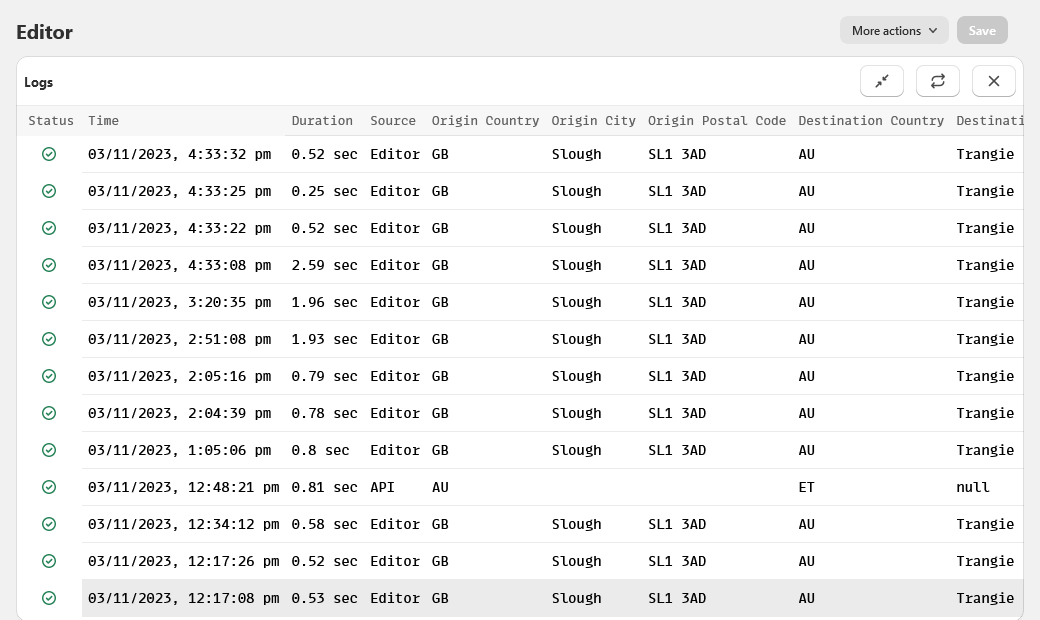
This opens the Logs Table inside the editor.
Using the Logs Table
The Logs table shows one row per execution and includes:
- Timestamp
- Source (checkout, editor, API, etc.)
- Status (success or error)
- Execution time
To view the full details: Click any log entry
This opens the full execution record, including:
- The exact request payload Shopify sent
- The shipping rates your code returned
- Print output
- Errors and stack traces
This makes it easy to answer questions like:
- Why did this customer get this rate?
- Why did checkout show no shipping options?
- Which item caused the failure?
Why Logs Are Critical
Shipping logic runs in real time during checkout — a single bug can block all shipping options and prevent orders.
Logs let you:
- Replay real checkout requests
- See exactly what data Shopify sent
- Verify your logic behaved correctly
- Fix bugs without guessing
They are the single most important debugging tool in JsRates.
Log Retention
JsRates stores the last 50 executions per store.
Older entries are automatically removed as new ones are added.
This keeps the log system fast while still covering all recent checkout activity.
Please be aware that if you choose to disable the log feature, it may become more challenging to diagnose any issues with your code.
Limitations
The maximum size of a single log entry is 128 KB.
If a log exceeds this limit, it will not appear in the recent Logs table.
To make sure your logs are always available, we recommend:
- Logging only the information relevant for debugging
- Avoiding printing large objects or full payloads repeatedly
- Removing verbose
print()andconsoleoutput once an issue is resolved
Example
Below is a sample of what the Logs table looks like: